Get your bearings
Press W A S D or the arrow keys to walk. Follow the arrow on the ground and move forward a few steps.
Play Island Cleaner Simulator online, a first-person island cleaning game. Explore the beach, collect rubbish and track your cleanup in your browser.
Browser game · Keyboard & mouse · No app installation
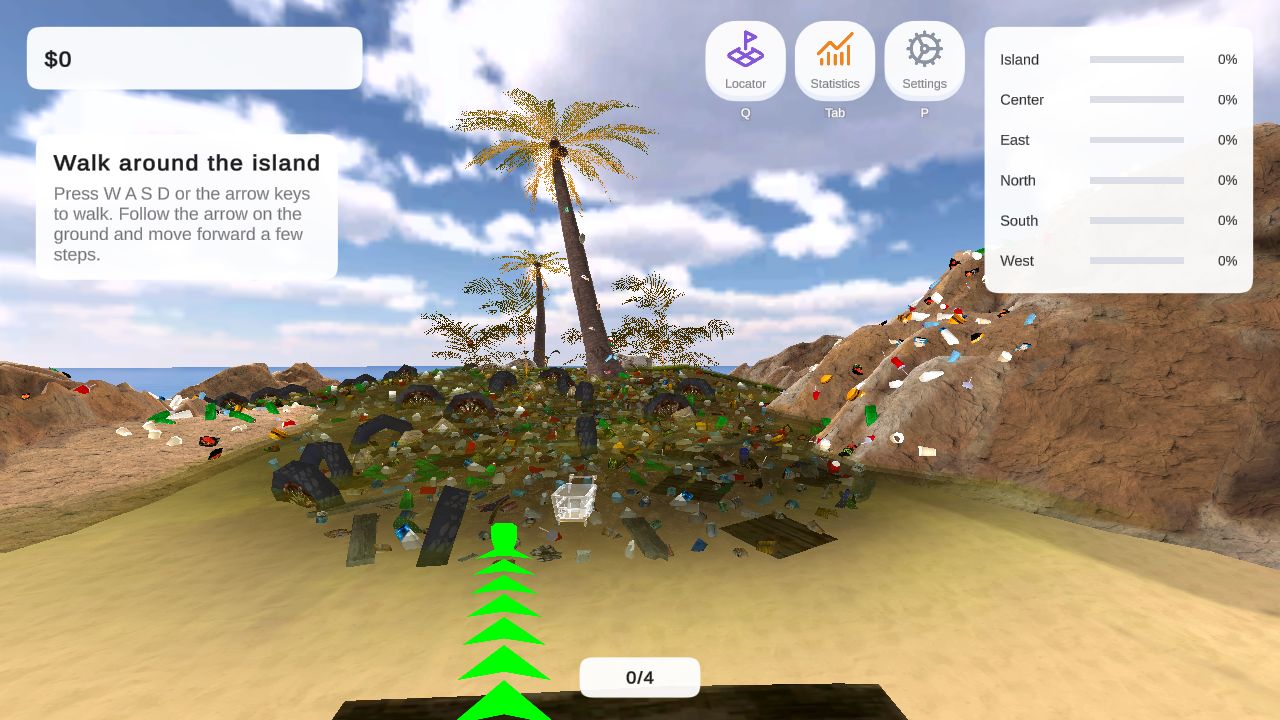
Island Cleaner Simulator puts you on the ground, among bottles, tyres and scattered litter. Follow the first tutorial prompts to learn movement, then work through the rubbish in front of you.
The HUD tracks the island and its named areas: Center, East, North, South and West. Use those progress indicators to see where your work is making a difference.
Press W A S D or the arrow keys to walk. Follow the arrow on the ground and move forward a few steps.
Walk up to the trash, aim at it, then press [Left mouse button] to pick it up.
Press Q for the locator and Tab for statistics. Open settings with P if the Camera sensitivity needs adjusting.
Island Cleaner Simulator is a first-person browser game about collecting rubbish on an island. You move through the environment yourself, approach the litter and use the game’s collection controls. The objective is easy to understand: work through the mess and use the on-screen indicators to follow your progress.
The opening scene gives you a concrete place to begin. A sandy route leads towards palm trees, while bottles, tyres and other rubbish cover the ground. The movement tutorial places a green marker ahead of you. Rather than leaving you to guess every control, the game introduces your first action with an instruction that you can complete before moving on.
For visitors looking for an island cleaning game online, Island Cleaner Simulator combines a playable browser build with a written controls guide. You can read the instructions first or go directly to the Island Cleaner Simulator online game. No app installation is required, although the browser still needs to download the game resources when you start.
The basic activity is movement, collection and progress checking. Use WASD or the arrow keys to walk around, then use the left mouse button to collect rubbish or interact when the game prompts you. Because this is a first-person game, it helps to learn how moving and turning feel before trying to clean a larger area.
Island Cleaner Simulator’s supplied game build displays an overall island progress indicator alongside Center, East, North, South and West. These labels give you a useful way to think about your session. You can concentrate on the area you are standing in, look at its percentage and decide whether to keep working there or explore somewhere else.
The shortcuts support that same loop. Press Q to open the locator, Tab to view statistics and P to open settings. If looking around feels uncomfortable, the Camera sensitivity is a practical place to start. Our Island Cleaner Simulator controls and beginner guide keeps these inputs together so you do not have to memorize them before your first attempt.
When you first play through Island Cleaner Simulator, let the tutorial set your pace. Complete the movement prompt by following the marker and walking the requested steps. Watch for the next instruction before assuming that every available action has already been introduced. This keeps your first session focused on learning the game rather than guessing what a button does.
Once collection is introduced, begin with nearby rubbish. Picking a small, visible patch gives you a manageable target and a clear view of the objects you are interacting with. Check the progress display occasionally, then move on when you want to explore another part of the island. There is no need to treat the whole scene as one task from the first minute.
If you lose track of the keyboard shortcuts, return to the guide or the controls shown below the game. Island Cleaner Simulator keeps the play page separate from the homepage, so the written instructions remain easy to find. On a desktop, you can also keep the guide in another tab while learning the controls.
Island Cleaner Simulator is best approached with a desktop or laptop, a keyboard and a mouse. The supplied controls are built around those inputs. We have not verified touch controls, so a phone visit should not be taken as a promise that the game supports comfortable touchscreen play. You can still browse the introduction and read the guide on a smaller screen.
The first game load can take longer than opening an ordinary webpage because the browser is downloading a 3D game. Press Start game and keep the tab open while the loading indicator advances. The homepage does not start that download automatically. This lets you read about Island Cleaner Simulator before deciding to load the playable build.
If keyboard input does not reach the game, click inside its canvas. Use a current browser with WebGL enabled if loading fails, and try reloading the play page after checking your connection. The fullscreen button can make the scene easier to see, while Esc lets you leave fullscreen or release the pointer when the browser captures it.
Island Cleaner Simulator’s guide covers the opening tutorial, visible controls and interface indicators. Full-game completion, persistent saves and cloud synchronization have not been verified for this build. If retaining progress matters to you, do not assume that switching devices, clearing browser storage or reopening the game will preserve your session.
Island Cleaner Simulator brings exploration and rubbish collection together in a first-person setting. The guide describes the controls and features confirmed in this browser build, so you can plan your first session before starting.
Ready to try the collection loop for yourself? Play Island Cleaner Simulator in your browser, follow the first tutorial prompt and start with the rubbish in front of you. For a reminder of the inputs, visit the keyboard controls guide. Questions or corrections about these pages can be sent to support@islandcleanersimulator.com.
Island Cleaner Simulator is a first-person island cleaning game you can play in your browser. Walk around a littered island, collect rubbish and follow the in-game tutorial.
Use WASD or the arrow keys to move and the left mouse button to collect or interact. Q opens the locator, Tab shows statistics and P opens settings.
No app installation is needed. The browser downloads the game resources when you press Start game. The first load can take longer than later visits.
This build is best played on a desktop or laptop with a keyboard and mouse. Touch controls have not been verified.
This build’s save persistence and cloud synchronization have not been verified. Do not rely on progress carrying over between browsers or devices.
Best experienced on a desktop or laptop.